HÖRST
Improving TV sound: What you can do
August 1, 2025
5 minutes reading time

OSKAR
Portable TV voice amplifier
Advertisement
Table of contents
We've all been there. You finally get to watch the latest blockbuster or your favorite series, but the sound leaves something to be desired. Muffled dialogue, flat bass, or background music that's too loud—all these factors can significantly detract from your viewing pleasure. Fortunately, there are numerous ways to improve your TV sound. In this guide, we'll show you what you can do to bring a cinema-quality sound experience right into your living room!

Why is good TV sound so important?
The tension rises, the film begins—but something isn't right. The sound from your TV can't keep up. The dialogue is flat, almost swallowed up by the loud, booming effects and background music. The magic of the moment evaporates, the immersion is broken.
Good TV sound isn't just a luxury. It's essential to truly capturing the complete experience that filmmakers and producers have created for viewers. The quality of sound influences our emotions, our attention, and ultimately our entire viewing experience.
TV sound also affectsspeech intelligibility. Especially in action-packed movies or series with lots of background noise, it can be crucial to hear every line of dialogue clearly in order to follow the plot. Nothing is more frustrating than having to constantly rewind because you missed an important piece of information.
But don't worry: the good news is that there are numerous ways to improve your TV sound. Whether your TV is brand new or several years old, there's a suitable upgrade for everyone.
The importance of room acoustics for television sound
Room acoustics are an often overlooked but crucial element when it comes to improving the quality of TV sound. They can make the difference between clear, immersive sound and sound that is muffled or echoey.
A room without furniture, carpets, curtains, or other soft surfaces tends to reflect sound. This can lead to unwanted echo effects and a general deterioration in sound clarity. Such a bare room can give the impression that the sound is coming from far away or from an empty hall.
In contrast, rooms with carpets, curtains, and other soft materials absorb sound, reducing annoying echoes and creating a warmer, more intimate listening experience. Such rooms tend to modulate sound so that it sounds closer, clearer, and more authentic.
Connecting speakers to a TV
Especially with older TV sets, connecting external speakers to the TV can significantly improve the sound. Think of the difference between a smartphone speaker and a complete home theater system. The step of connecting aTV speakerto your television could be the key to clear and loud sound in your living room.
But not all TV speakers are created equal. MostTV soundbarsand speaker systems provide a richer sound and better volume—just like when you connect an amplifier to your TV. With Dolby and surround sound technologies, subwoofers, and other features, they bring the cinema experience right into your living room.
However, what usually gets lost is the language. In turbulent action scenes, loud background noises, or loud background music, speech such as monologues or dialogues often gets lost.
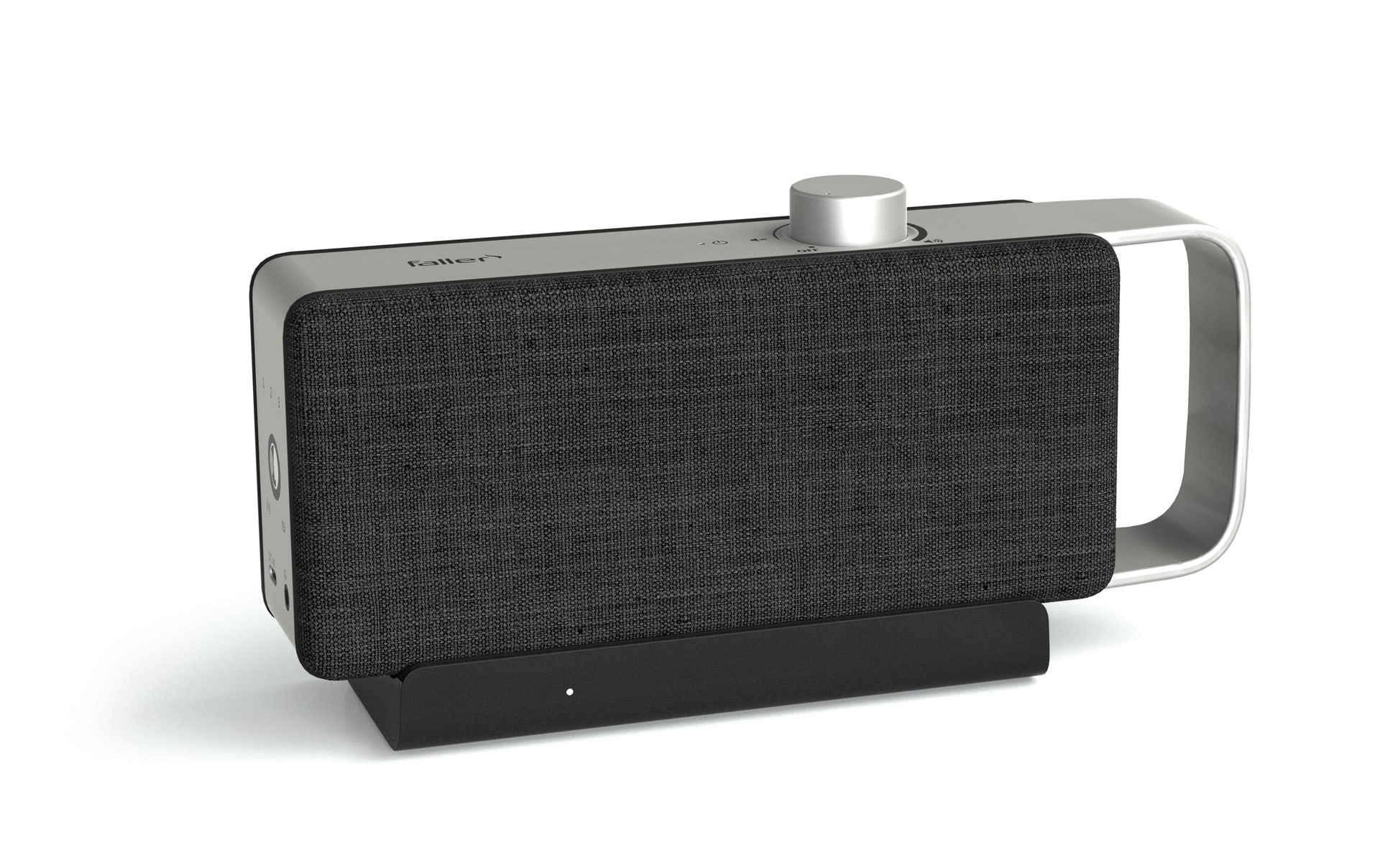
The company faller audio has addressed this problem and, together with hearing care professionals, developed a solution: the OSKAR TV sound amplifier.
Improve your TV sound with OSKAR
TheOskar TV sound amplifierwas specially developed to improve TV sound. And what's more, with its special dialogue optimization, it ensures that users can understand speech better again.
An algorithm highlights certain frequency ranges that are crucial for the human ear to hear dialogue more clearly. Acoustic profiles are used to optimally adjust the ratio of speech to background noise, especially for people with impaired hearing.
The TV transmits the sound wirelessly to the compact TV audio amplifier. The passive driver and two speakers ensure clear and distinct speech output.
Simple operation, big impact
Handling is child's play: you can simply connect the speaker to your TV. To ensure an optimal sound experience, we recommend using an optical audio cable. However, if your TV does not have a digital optical audio output/optical audio input, or if it is already occupied by another device, you can connect a 3.5 mm audio cable instead. This can be connected via the headphone jack on your TV.
With just two buttons, you can now control the TV audio amplifier, adjust the volume, and adjust the speech clarity if necessary.
TV speakers and headphones: an immersive listening experience
The OSKAR TV speaker is designed to be placed directly at the listening position to ensure optimal speech intelligibility. The device features a practical handle that makes it easy to transport. Thanks to a strong signal with an impressive range of up to 30 meters, you can enjoy TV sound throughout your home. And for those who want an even more intense and undisturbed sound experience, the OSKAR offers a headphone jack. This allows you to use your TV speaker and headphones at the same time, so you can immerse yourself in your favorite shows without being distracted by outside noise.
Further articles

Healthy candy alternatives for seniors
For many people, craving sweets is part of everyday life. However, traditional sweets often contain large amounts of sugar and provide

Cooking together in old age
As we get older, our everyday lives change in many ways. The children have left home, our partner may be

Protein-rich nutrition in old age
As we age, our bodies change in many ways, and nutrition plays a crucial role in our health.