HÖRST
Audio settings for TV speakers
September 15, 2025
14 minutes reading time
OSKAR
Portable TV voice amplifier
Advertisement
Table of contents
The right audio settings are crucial for getting the most out of TV speakers. Clean, clear sound ensures that dialogue is understandable, bass is rich, and treble is precise. With modern technologies such as Dolby Atmos or surround sound systems, the sound is becoming increasingly sophisticated—but only if the setup is right. Whether you have a soundbar, subwoofer, or home theater system, the right settings can transform any living room into an acoustic experience. In this article, you'll learn everything you need to know about setting up and fine-tuning TV speakers.
The most important information in brief
- HDMI ARC/eARC offer lossless audio transmission and Dolby Atmos support – optical connections as a stable alternative, Bluetooth for wireless flexibility
- Optimize basic settings: Volume with automatic equalization, balance for consistent sound, sound modes (movie/music/sports) for content-adapted playback
- Dolby Atmos creates three-dimensional sound from all directions – surround sound systems (5.1/7.1) require correct speaker placement for an immersive experience.
- Fine tuning via equalizer for individual sound adjustment to room acoustics – bass management prevents interference with other frequency ranges
- Troubleshooting: Check connections if there is no sound, adjust audio delay if sound is out of sync, adjust equalizer if sound quality is poor
- Regular firmware updates improve sound quality, fix connectivity issues, and unlock new features such as Dolby Atmos.
First steps: Connecting the speaker to the TV
The connection is the first and most important step for good sound. Modern televisions offer a variety of connection options, which vary depending on the type of speaker.
HDMI ARC and eARC
HDMI ARC (Audio Return Channel) and eARC (Enhanced Audio Return Channel) are the optimal options for lossless audio transmission. HDMI ARC enables the simultaneous transmission of audio and video signals via a single cable. This reduces cable clutter and ensures easy integration into your home theater system. With eARC, the enhanced version of ARC, high-resolution audio formats such as Dolby Atmos can be transmitted. This significantly improves the home theater experience, as eARC offers higher bandwidth for complex audio formats and reproduces sound even more accurately.
Optical connections
Optical connections offer a good alternative to HDMI, especially for older devices that do not support HDMI ARC or eARC connections. Optical cables transmit high-quality digital audio signals and are found in many TV speaker systems and soundbars. They provide a stable connection and are a proven way to transmit sound from TVs to external speakers. However, optical connections do not support multi-channel audio formats such as Dolby Atmos, making them less suitable for high-resolution audio formats.
Bluetooth
Bluetooth offers a wireless way to connect speakers or soundbars to your TV. It allows for easy pairing and offers flexibility, as no cables are required. Bluetooth is particularly suitable for users who are looking for a simple, wireless solution. However, Bluetooth connections can suffer from latency, which can lead to asynchrony between the picture and sound. This can be particularly distracting when watching movies and TV shows, as the sound does not match the actors' lip movements exactly.
Analog connections (RCA or AUX)
For older speaker systems, analog connections such as RCA or AUX are a good choice. These offer a simple way to transfer audio from televisions to external speakers. While the analog connection is limited in terms of sound quality, it is still suitable for connecting older devices or speakers that do not offer digital connections. However, the sound quality is limited compared to digital connections such as HDMI or optical.
The OSKAR TV speaker
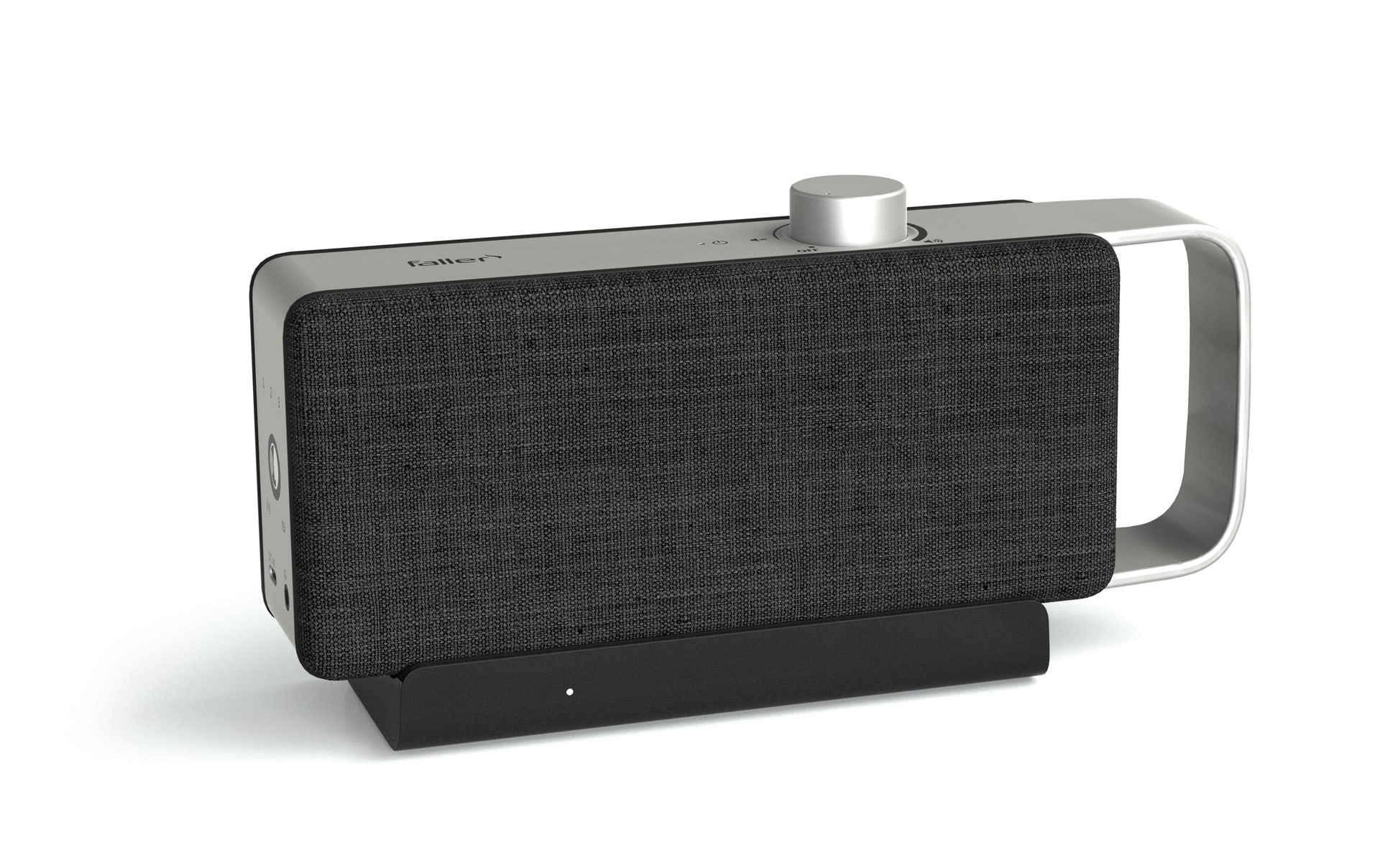
The OSKAR TV speaker is a particularly useful device for clear and understandable dialogue. It is an excellent choice for anyone who wants to improve their TV sound. The OSKAR is wireless, as the signal is sent from the base station to the TV speaker, allowing for flexible placement without annoying cables. The OSKAR can be easily connected to any TV and is particularly useful for older devices that do not support modern technologies such as HDMI eARC. With its ease of use and excellent speech intelligibility, the OSKAR offers a versatile solution for optimizing the listening experience.
Basic audio settings: Volume, balance, and sound modes
Once you have connected the speakers to your TV, it's time to adjust the basic audio settings, which have a significant impact on the sound experience. These settings ensure that the sound is not only pleasant, but also optimally adapted to the room and the content.
volume
Volume plays a key role in ensuring a good listening experience and should be set so that the sound is clear and easy to understand without straining the ears. An appropriate volume not only protects against hearing damage, but also ensures that the sound is pleasant to listen to without being too quiet or too loud.
Many televisions and speaker systems offer the option of equalizing volume differences. This means that the system automatically adjusts the volume to compensate for differences between quiet dialogue and loud effects. This feature ensures that dialogue in quiet scenes is just as clearly audible as loud effects in action sequences, without having to constantly adjust the volume.
Different content requires different volume settings. Quiet dialogue, as often found in dramas or dialogue-heavy scenes, requires a higher volume, while action films or scenes with lots of sound effects tend to require a lower volume to ensure a comfortable balance between the various audio elements.
balance
The balance setting ensures that the sound comes evenly from all TV speakers and that no one side dominates. With a surround sound system, it is particularly important to adjust the balance so that the sound is even and seamless from all directions. If the balance is not set correctly, the sound may be perceived as louder or distorted from a certain direction.
When fine-tuning the balance, it is important to position the center speaker, which is the central sound source, correctly. This speaker is mainly responsible for dialogue and should be aligned so that the sound is directed straight to the seating position. A correctly aligned center speaker ensures that dialogue is clear and intelligible without being drowned out by other speakers or noise.
sound modes
Modern televisions and speaker systems offer various sound modes that adapt the audio experience to the respective content. These modes allow you to personalize your listening experience by emphasizing certain audio elements as needed.
Movie mode is ideal for highlighting dialogue and emphasizing surround effects. This ensures that in movie scenes where there is a mixture of dialogue and action, both voices and ambient sounds and sound effects are reproduced clearly and precisely.
Music mode delivers clear highs and rich bass to emphasize the dynamic sound of music tracks. This mode is particularly well suited for playing music, as it balances the different frequencies and makes the sound more vivid and spacious.
Sport mode is designed to emphasize clear commentary and ambient sounds. This mode is ideal for sports broadcasts, where the intelligibility of voices and the sounds of the game are paramount, while background music and other distracting noises are minimized.
In addition to these three modes, many televisions offer other modes, such as Standard, Dialogue, or Dolby Digital. These basic audio settings make it easy to optimize the sound experience so that the audio is always adapted to the content and the conditions of the room.
Configuring Dolby Atmos and surround sound
Technologies such as Dolby Atmos or surround sound systems are essential for a true home theater experience. The right setup makes all the difference here, ensuring that the sound is tailored to the entire room.
Dolby Atmos
Atmos-enabled speakers or soundbars produce three-dimensional sound that simulates sounds coming from above and from all directions. This creates an immersive listening experience in which the sound comes not only from the front or sides, but also from above, which adds a special depth, especially in action movies or 3D audio formats. To use Dolby Atmos, you need a compatible TV or receiver that supports Atmos. In addition, you must also have content that uses Dolby Atmos to take full advantage of the technology. Many streaming services now offer movies and series in Dolby Atmos that can unleash the full potential of this technology.
surround sound systems
With 5.1 or 7.1 systems, which enable even broader sound reproduction, the placement of the speakers is crucial for the surround sound. The front speakers should be positioned to the left and right of the TV to direct the main sound directly to the seating position. The center speaker, which is primarily responsible for reproducing dialogue, should be placed in the middle and at ear level. The rear speakers, which are responsible for background noise and ambient sounds, should be placed behind the seating position to complete the surround sound and create a feeling of immersion.
The placement of the speakers plays a key role here, as it directly influences the sound. Incorrect positioning of the speakers can lead to an unbalanced sound image, in which, for example, dialogues are difficult to understand or surround effects are distorted.
Use calibration microphones
Many receivers offer automatic calibration functions that adjust the sound of the system to the room acoustics. A calibration microphone is used to analyze the acoustics of the room. The receiver then adjusts the speaker levels, delay times, and speaker positions to ensure optimal sound reproduction. This allows the sound to be precisely tuned to the size and shape of the room and the specific speaker arrangement. Using a calibration microphone is a quick and easy way to perfectly adjust your home theater system without any manual effort.
Fine tuning: Equalizer and bass management
Individual sound control is the key to tailoring the sound experience to personal preferences and adapting the sound to the room acoustics and media content.
Use equalizers
An equalizer allows you to adjust the treble, midrange, and bass individually to tailor the sound to your preferences. The equalizer can help balance the sound, especially in rooms with difficult acoustics, such as those with many hard surfaces or an irregular shape. Such rooms often tend to amplify or attenuate certain frequencies, which can lead to an unbalanced sound. The equalizer allows you to make the treble clearer and the midrange more precise without dominating the bass, so that the sound remains full and balanced even in challenging acoustic conditions.
By adjusting the different frequency ranges, the sound can be optimally tailored to the room and your listening preferences. Using the equalizer helps all elements of the sound system to harmonize with each other, creating a pleasant listening experience.
bass management
The subwoofer is responsible for the low frequencies and contributes significantly to the richness of the sound. Targeted bass management is required to optimally integrate the bass into the overall system. The subwoofer should be adjusted so that the low frequencies are present but do not overwhelm the other sound ranges. Too high a bass level can make dialogue difficult to understand and cause important details in the sound to be lost. If the bass becomes too dominant, the entire sound image becomes unbalanced and distorted.
Properly adjusting the subwoofer ensures that the bass is powerful and precise without compromising the clarity of the mid and high frequencies. Especially with action movies or music with deep bass, it is important to find the right balance so that the bass enhances the mood without drowning out the other sound components.
Troubleshooting: Solving problems with audio settings
Even with the best setup, minor issues can arise that affect the sound experience. Fortunately, many of these problems can be resolved with simple measures. Here are common mistakes and detailed solutions:
No sound
- Check connections: Ensure that all cables are securely plugged in and show no physical damage. HDMI or optical cables cannot transmit sound if they are damaged.
- Select the audio source in the TV menu: Adjust the audio settings in the TV menu. Ensure that the correct source (e.g., HDMI ARC, optical, or Bluetooth) is selected. For soundbars or surround sound systems, often activate the "external speakers" option.
- Restart devices: Turn the TV and speakers off and on again to resolve connection issues.
- Test the hardware: If there is still no sound, connect the speaker to another device to rule out a defect.
Asynchronous sound
- Use audio delay settings: Modern televisions and receivers offer an option to adjust the audio delay. This setting ensures that the picture and sound are synchronized again.
- Check Bluetooth connections: Wireless connections can cause asynchronous sound due to latency. Devices with aptX Low Latency or wired connections are often the better choice.
- Install firmware updates: Some devices resolve synchronization issues through software updates. Check for updates regularly and install them.
Poor sound quality
- Optimize room acoustics: Reflections and echoes in the room can impair sound quality. Carpets, curtains, and furniture help to reduce disruptive resonance.
- Adjust equalizer settings: Individually adjust treble, midrange, and bass to tailor the sound to the room acoustics and your preferences. Dialogue can be made clearer by boosting the midrange.
- Check the placement of the speakers: Speakers should be at ear level and not directly against walls or in corners. Incorrect placement can significantly distort the sound.
Interference or distortion
- Check the signal source: Distorted sound can come from a poor signal source, such as a damaged HDMI cable or a faulty Bluetooth connection.
- Adjust the volume: Excessive volume settings on the TV or speakers can cause distortion. The volume should be set so that the sound remains clear.
- Test cables and connections: Use high-quality cables with good shielding to prevent interference from other devices.
Bluetooth connection issues
- Disconnect and reconnect: If the Bluetooth connection is unstable, disconnect the devices and reconnect them.
- Stay within range: Bluetooth generally only works within a radius of 10 meters without obstacles. Walls and furniture can weaken the connection.
- Reduce interference: Other wireless devices such as Wi-Fi routers or smartphones can cause interference. Increase the distance between these devices.
Subwoofer or speakers not working
- Check connections: Ensure that the subwoofer or individual speakers are connected correctly, especially for wireless systems.
- Check the settings on your receiver or TV: Some devices switch individual speakers or the subwoofer to standby mode when they are not actively in use. This function can be deactivated.
firmware error
- Update software: Many sound problems are caused by faulty firmware. Regular updates not only bring new features, but often fix known bugs as well.
- Reset device to factory settings: If nothing else helps, you can reset your TV or speakers to their factory settings. This will remove any incorrect configurations and allow you to set them up again.
Firmware updates: Keep devices up to date
Firmware updates are important for unlocking new features and fixing bugs that could affect a device's performance. They help ensure that both TVs and speakers are always equipped with the latest technologies and improvements.
Why updates are important
Many televisions and external TV speakers receive regular software updates that not only improve sound quality but can also add new features. A good example of this is the introduction of Dolby Atmos via a firmware update, which enhances the sound experience by making the sound more three-dimensional and immersive. These updates can also fix existing bugs, such as connection or synchronization issues, and ensure that devices work together optimally. Without regular updates, devices could stagnate in performance and potential bugs could go unfixed.
Tips for updates
It is advisable to regularly check for available updates in the menu of your TV or speakers. Many devices offer an automatic update function that ensures that the latest versions are always installed. However, it is also a good idea to check for updates manually, especially if the device has not been updated for a long time. Installing the latest firmware updates usually only takes a few minutes and ensures that the devices are equipped with the latest features and improvements.
Further articles

Healthy candy alternatives for seniors
For many people, craving sweets is part of everyday life. However, traditional sweets often contain large amounts of sugar and provide

Cooking together in old age
As we get older, our everyday lives change in many ways. The children have left home, our partner may be

Protein-rich nutrition in old age
As we age, our bodies change in many ways, and nutrition plays a crucial role in our health.